Is it difficult to create websites with Drupal?
http://www.youtube.com/user/SiteMadeRu - this is my YouTube channel, subscribe to receive new videos!
Drupal how to install translation
http://www.youtube.com/user/SiteMadeRu - this is my YouTube channel, subscribe to receive new videos!
If your site will be located in the .ru zone, you'll most likely need to localize it to Russian. We already have a standard Drupal installation in English. To localize it, we need a .po file that contains the translation of the entire site interface. Go to drupaler.ru and follow the “download” link.
Russian localization for Drupal 7:
Drupal how to install a module. Drupal modular structure.
Drupal 7:
We already have Drupal installed on our created platform. Now it’s time to understand what Drupal is and how to work with it.
Drupal how to install theme. Templates, Drupal themes.
The themes are configured under Site Building - Themes - List. By default (in Drupal version 6.x), the list includes the following themes: Bluemarine, Chameleon, Garland, Marvin, Minneli, Pushbutton.
You can choose any of these themes or add another one.
Templates, Drupal themes. Customize themes, regions and blocks.
In the previous lesson, we installed the Drupal theme Forest Floor, after which the appearance of the site changed, but all the content and menu links remained. This is because the theme controls only the site's appearance. Now let's take a look at what each Drupal theme consists of.
File: theme_name.info
Drupal as a CMS. Creating pages and menus
I already wrote in the previous lesson that Drupal consists of two connected parts: CMS and CMF. In this lesson, we will look at how to create simple websites using CMS Drupal.
Let’s start with the common sections a website is divided into:
Header (top section): This is the header of the website, usually containing the logo and site name, contact information, user name, or anything else.
Drupal - Users, Roles, Permissions
Every site created with Drupal has a superuser whose login and password you specify during installation. You should remember this login and password, as they are required for Drupal configuration. Typically, the login for this user is Admin. The superuser has no restrictions on their actions—they can delete any comments, edit anything anywhere, and limit what other users can do.
Installing Drupal on hosting
When you create a site on Denwer, only you will be able to view your site on your local computer. To publish it on the Internet, you need a hosting service where your Drupal site will be located. The easiest way is to rent a virtual hosting service from a hosting provider. So, what do we need to create a fully functioning website:
1. Create an account and rent hosting based on a tariff plan. To start, 100 MB of space is enough; over time, as your site grows, you can always switch to a more suitable plan.
How to update Drupal? How to update a Drupal module?
Drupal is a constantly evolving system, with frequent updates being released. This does not mean that Drupal is poorly made and requires fixes. On the contrary, most updates include changes to API functions that enhance Drupal's capabilities, and security updates are relatively rare. It is important to always keep your modules and the Drupal core up to date. In this article, we will look at how to update both modules and Drupal itself.
Backup of the site (backup of the site). Transferring the site on Drupal to another domain name
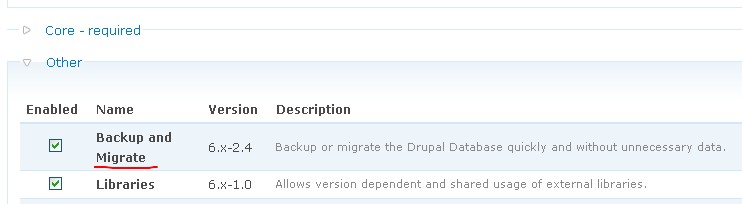
Creating a Backup with Backup and Migrate
Use the Backup and Migrate module to create a copy of your Drupal site.
Download the module backup and migrate. Install and enable it.